In this article
- What does robots.txt actually do?
- What are the three kinds of AI bot?
- Which AI crawlers exist, and what does each one do?
- Are search and training crawlers independent?
- How does Google fit in?
- Which policy should you choose?
- What should my robots.txt look like?
- Why does a welcoming robots.txt still fail? The firewall layer
- How do I check that it works?
- What goes wrong on WordPress?
- Common failure modes at a glance
- What should I monitor over time?
- How do you tell whether a bot is real?
- How do you read your logs for AI bots?
- What about staging and development sites?
- A decision worksheet
- What should you tell your developer or host?
- How often should you review it?
- A quick reference card
- Sources
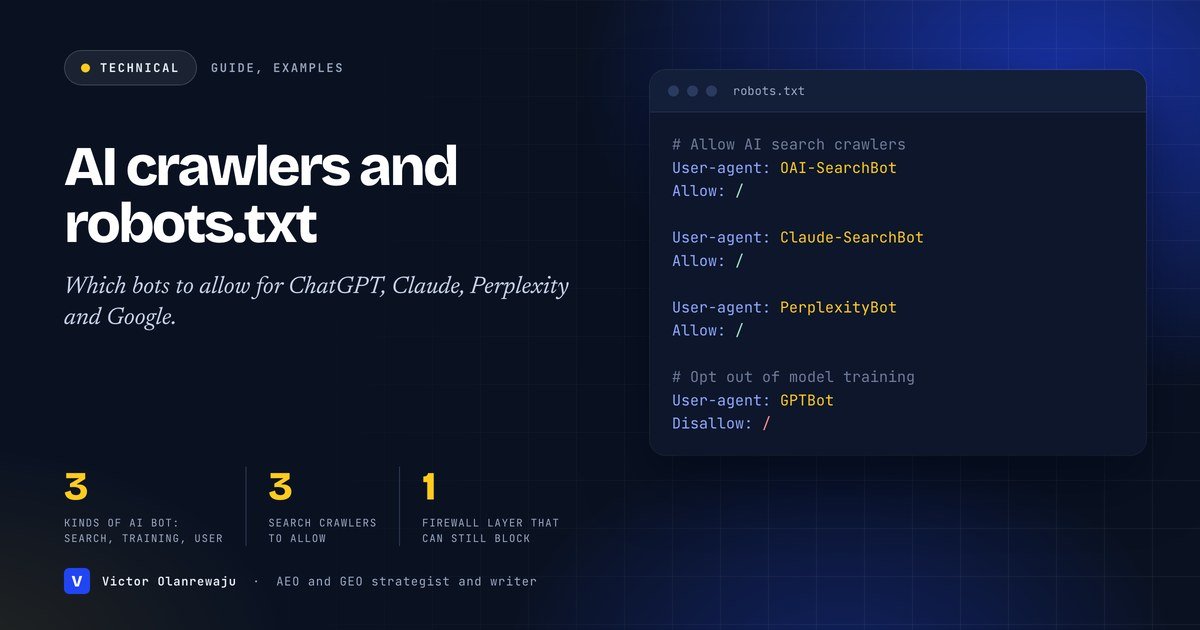
In short: OpenAI, Anthropic and Perplexity each run separate crawlers for search, for model training and for fetching pages when a user asks a question. If you want to appear in an assistant’s search answers, allow its search crawler (OAI-SearchBot, Claude-SearchBot, PerplexityBot). Whether to allow the training crawlers (GPTBot, ClaudeBot) is a separate decision, and blocking them does not remove you from search. Check your robots.txt, your firewall and your CDN, because any of them can silently block the bots you want. Google’s AI features run on ordinary Googlebot access, with separate preview controls.
Crawler access is the first gate in AI visibility. If the bot that powers an assistant’s search cannot read your pages, nothing else you do will show up there. It is also the easiest gate to get wrong, because three different layers can block a crawler: your robots.txt, your firewall or CDN and, on WordPress, a single checkbox in your settings. This guide explains what each AI crawler does using each company’s own documentation, shows configurations for the three most common policies and gives you a checklist to verify it works. It is part of the sequence in how to get cited by ChatGPT.
What does robots.txt actually do?
A robots.txt file tells crawlers which URLs they may request on your site. Google’s documentation on robots.txt says it is used mainly to avoid overloading your site with requests and is not a mechanism for keeping a web page out of Google. If a page blocked by robots.txt is linked from elsewhere with descriptive text, its URL can still appear in results, without a description. To keep a page out of Google, use noindex or password protection. Google also notes that robots.txt rules cannot enforce crawler behaviour: respectable crawlers obey them, other crawlers might not, so use password protection for anything private.
The same logic applies to AI crawlers. Robots.txt is a request that well-behaved bots honour, not a security control. It is also a public file: anyone can read it at yourdomain.com/robots.txt.
What are the three kinds of AI bot?
The names matter, because the company that makes a crawler decides what it is for, and most companies now separate the jobs.
- Search crawlers index pages so an assistant can surface and cite them in search-style answers.
- Training crawlers collect content that may be used to train models.
- User-initiated fetchers visit a page because a user asked a question or took an action, to read it and often link to it.
Treating these as one bucket (“AI bots”) leads to blunt rules that either hide you from assistants or give away more than you intended.
Which AI crawlers exist, and what does each one do?
These descriptions are taken from each company’s own documentation, which you should check again before editing a live file because bot behaviour changes.
| Company | User agent | Purpose | If you block it |
|---|---|---|---|
| OpenAI | OAI-SearchBot | Surfaces websites in ChatGPT’s search features | Your site will not be shown in ChatGPT search answers, though it can still appear as a navigational link |
| OpenAI | GPTBot | Crawls content that may be used to train generative AI foundation models | Indicates your content should not be used in training |
| OpenAI | ChatGPT-User | Visits pages for certain user actions in ChatGPT and Custom GPTs | OpenAI says robots.txt rules may not apply, because the action is user-initiated |
| Anthropic | ClaudeBot | Collects web content that could contribute to model training | Signals that future materials should be excluded from training datasets |
| Anthropic | Claude-SearchBot | Improves the quality of search results for users | Prevents indexing your content for search optimization, which may reduce visibility and accuracy in search results |
| Anthropic | Claude-User | Accesses sites when a Claude user asks a question | Prevents retrieval in response to a user query, which may reduce visibility for user-directed search |
| Perplexity | PerplexityBot | Surfaces and links websites in Perplexity search results | Perplexity says it is not used to crawl content for AI foundation models |
| Perplexity | Perplexity-User | Visits a page to answer a user’s question and include a link | Not used for crawling or training, and Perplexity says this fetcher generally ignores robots.txt rules because a user requested the fetch |
Primary sources: OpenAI, Anthropic and Perplexity.
Are search and training crawlers independent?
Yes. OpenAI states that each of its settings is independent of the others. A site can allow OAI-SearchBot in order to appear in search results while disallowing GPTBot to indicate that its content should not be used for training. OpenAI adds that if a site allows both, it may use the results of one crawl for both uses to avoid duplicative crawling, and that for search results it can take about 24 hours from a robots.txt update for its systems to adjust. Anthropic similarly describes ClaudeBot, Claude-User and Claude-SearchBot as separate bots with separate effects, and says its bots honour industry-standard robots.txt directives, support the non-standard Crawl-delay extension, and do not attempt to bypass CAPTCHAs.
How does Google fit in?
Google’s AI Overviews and AI Mode are part of Search, so access is governed by Googlebot. Google’s documentation on AI features says that robots.txt directives for Googlebot are the control for site owners to manage how their sites are crawled for Search, and that to limit the information shown from your pages in Search you can use nosnippet, data-nosnippet, max-snippet or noindex controls. It separately says that to limit AI training and grounding in some of Google’s other systems you should read about Google-Extended. It also states, as foundations for appearing in AI features, that crawling must be allowed in robots.txt and by any CDN or hosting infrastructure.
Which policy should you choose?
This is a business decision, not a technical one. Three common positions:
| Policy | Who it suits | Trade-off |
|---|---|---|
| A. Open to everything | Businesses that want maximum visibility and have no licensing concern | Your content may be used for training as well as search |
| B. Visible in search, opt out of training | Publishers and businesses that want citations but not training use | Training opt-out is a signal; check each vendor’s current documentation |
| C. Opt out of everything | Sites with strict licensing or confidentiality needs | You will not appear in assistants’ search answers |
For most businesses that want customers to find them through assistants, A or B is the right choice. I recommend deciding deliberately, writing the decision down and reviewing it twice a year.
What should my robots.txt look like?
Policy A: open to everything
User-agent: *
Allow: /

Sitemap: https://example.com/sitemap.xml
A simple, permissive file is often enough. If your existing file has no AI-specific rules and no blanket disallow, you are already in this position.
Policy B: visible in search, opted out of training
# Allow AI search and user-request crawlers
User-agent: OAI-SearchBot
Allow: /

User-agent: ChatGPT-User
Allow: /

User-agent: Claude-SearchBot
Allow: /

User-agent: Claude-User
Allow: /

User-agent: PerplexityBot
Allow: /

User-agent: Perplexity-User
Allow: /

# Opt out of model training
User-agent: GPTBot
Disallow: /

User-agent: ClaudeBot
Disallow: /

Sitemap: https://example.com/sitemap.xml
Policy C: opt out of AI crawlers
User-agent: OAI-SearchBot
Disallow: /

User-agent: GPTBot
Disallow: /

User-agent: Claude-SearchBot
Disallow: /

User-agent: ClaudeBot
Disallow: /

User-agent: PerplexityBot
Disallow: /
This website uses an explicit allow list for the search and user-request crawlers so that assistants can read and cite it. Anthropic notes that blocking by IP address instead of robots.txt may not work correctly or persistently, because it impedes the ability to read your robots.txt file, so use robots.txt as the opt-out mechanism.
Why does a welcoming robots.txt still fail? The firewall layer
This is the most common hidden cause. Robots.txt says you welcome a bot, but a web application firewall (WAF), a CDN rule or a security plugin blocks it before it reaches your pages. OpenAI recommends allowing OAI-SearchBot in robots.txt and allowing requests from its published IP ranges. Perplexity makes the same recommendation for PerplexityBot and publishes IP lists for both its bots, and its documentation includes WAF configuration guidance for providers such as Cloudflare, noting you may need to explicitly allow its bots. Check these in order:
- CDN and bot-protection settings (for example “block AI bots” toggles) that may be on by default.
- WAF rules that rate-limit or challenge unknown user agents.
- Security plugins on WordPress that block by user agent or country.
- Hosting-level rules in your control panel.
Each company publishes its IP ranges as machine-readable files that you can use in allow rules. Verify the current URLs in each company’s documentation, because they change.
How do I check that it works?
- Read the file. Open yourdomain.com/robots.txt and read it as the bots would. Look for a blanket “Disallow: /” under “User-agent: *”, for old rules aimed at scrapers, and for missing sitemap lines.
- Test with the user agent. From a terminal, request a page while presenting a bot user agent, to catch rules that block by user agent:
curl -I -A "OAI-SearchBot/1.4" https://example.com/
curl -I -A "PerplexityBot/1.0" https://example.com/
A 200 response is a good sign. A 403 or a challenge page means a rule is blocking it. This does not test IP-based rules, which is why the next step matters.
- Read your logs. Look in server or CDN logs for these user agents and confirm they are arriving and getting 200 responses.
- Wait for changes to propagate. OpenAI says about 24 hours for search.
- Test the outcome. Ask the assistants questions you want to be found for and check whether your pages are cited, using this 30-minute test.
What goes wrong on WordPress?
- “Discourage search engines from indexing this site.” In Settings, Reading, this checkbox is often left on after a staging build. It asks search engines not to index the site and changes the robots.txt WordPress generates.
- Two robots.txt files. WordPress can serve a virtual robots.txt while a physical file on the server overrides it. Check which one is live.
- SEO and security plugins that write their own rules, sometimes aggressively.
- Host-level toggles that add rules for AI bots without telling you.
- Caching. After editing, clear caches and re-fetch the file.
Common failure modes at a glance
| Symptom | Likely cause | Fix |
|---|---|---|
| Never cited by ChatGPT despite good pages | OAI-SearchBot blocked in robots.txt or firewall | Allow it in both, and allow its IP ranges |
| Cited by Perplexity but not Claude | One bot allowed, another blocked | Check each user agent separately |
| Robots.txt looks fine but logs show 403s | WAF or CDN rule | Add allow rules or disable the AI-bot block toggle |
| Private page appears in Google | Relying on robots.txt to hide it | Use noindex or password protection |
| Whole site missing from AI answers | WordPress “discourage search engines” on, or staging robots.txt left live | Turn it off, replace the file |
What should I monitor over time?
Bots, policies and documentation change. Put a quarterly reminder in your calendar to re-read the three vendor pages, check your logs for new user agents and re-run your AI visibility test. When a vendor adds a new crawler, decide deliberately whether to allow it instead of leaving the outcome to a blanket rule. For the bigger picture of what to do once access is sorted, see AI citation versus AI recommendation and SEO, AEO and GEO explained. If you would like me to audit your crawler access and AI visibility, see my GEO strategist page.
How do you tell whether a bot is real?
A user agent string is just text, and anyone can send “GPTBot” in a request. If you want to allow real AI crawlers while blocking impostors, you need more than the user agent. Each company publishes the IP ranges its crawlers use. OpenAI’s documentation links its published IP addresses, and Perplexity publishes separate machine-readable lists for PerplexityBot and Perplexity-User, so you can compare the source address of a request against the list. Anthropic’s documentation says that a crawler with a source IP address on its published list is coming from Anthropic. Use these lists for allow rules in a firewall, and verify them against the documentation because they change.
Anthropic adds a caution worth remembering: blocking by IP address instead of using robots.txt may not work correctly or persistently, because doing so impedes its ability to read your robots.txt file. In other words, use robots.txt to express your policy and IP lists to let the right traffic through.
How do you read your logs for AI bots?
If you can access server logs, a simple search shows who is visiting. On a typical Linux server with standard access logs:
grep -i -E "OAI-SearchBot|GPTBot|ChatGPT-User|ClaudeBot|Claude-SearchBot|Claude-User|PerplexityBot|Perplexity-User" access.log | awk '{print $9}' | sort | uniq -cThat counts HTTP status codes returned to those user agents. A healthy result is mostly 200 responses. A pile of 403 or 429 responses means a rule is blocking or throttling them. Many hosts show the same information in a control panel or through a CDN dashboard, so use whichever you have.
What about staging and development sites?
A frequent cause of “we vanished from AI” is a staging configuration reaching production. Staging sites should be protected by authentication, because robots.txt is only a request and a blocked URL can still appear in results without a description. When you launch, replace the staging robots.txt, turn off any “discourage search engines” setting and check the live file with a fresh request. Put these three steps in your launch checklist and repeat them after every migration.
A decision worksheet
Answer these questions once, write the answers down and use them to choose between Policy A, B and C:
- Do I want customers to find me through AI assistants’ search answers? If yes, allow the search crawlers.
- Does my content have licensing or confidentiality constraints? If yes, restrict the training crawlers and anything private.
- Do I earn money directly from the content itself, as a publisher does? If yes, weigh the value of being cited against reuse.
- Do I have private or paid pages? Protect them with authentication, not robots.txt.
- Who owns this decision, and when will we review it?
What should you tell your developer or host?
If someone else manages your server, a short, specific brief avoids misunderstandings. Adapt this:
- We want OAI-SearchBot, Claude-SearchBot, PerplexityBot and the user-request agents ChatGPT-User, Claude-User and Perplexity-User to be able to fetch our public pages.
- Please confirm that no firewall, CDN or security plugin rule blocks them by user agent, country or rate limit, and allow the IP ranges each company publishes.
- Our policy for training crawlers (GPTBot and ClaudeBot) is: [allow or block].
- Please send us the current robots.txt and tell us whether it is a physical file or generated by the CMS.
- Please confirm that the production robots.txt is not the staging file and that the CMS setting that discourages search engines is off.
- Please send us a week of log lines for these user agents, with status codes.
How often should you review it?
Put a short routine in your calendar every quarter:
- Re-read the three vendor pages for new or changed crawlers.
- Re-fetch your live robots.txt and compare it with what you expect.
- Check your logs for the response codes returned to AI user agents.
- Re-run your AI visibility test and compare with the last quarter.
- Record any policy change and the reason.
A quick reference card
| If you want to… | Allow |
|---|---|
| Appear in ChatGPT search answers | OAI-SearchBot (and its IP ranges) |
| Appear in Claude’s search results | Claude-SearchBot |
| Appear in Perplexity results | PerplexityBot (and its IP ranges) |
| Let assistants read your page when a user asks | ChatGPT-User, Claude-User, Perplexity-User |
| Appear in Google AI Overviews and AI Mode | Googlebot, with the page indexed and eligible for a snippet |
| Opt out of model training | Disallow GPTBot and ClaudeBot (and see Google’s guidance on Google-Extended) |
Whether training opt-outs are respected and what they cover is for each company to say, so for licensing-sensitive content read their current documentation and take legal advice where needed.
Sources
Frequently asked questions
Should I block GPTBot?
That depends on your policy. GPTBot is used to crawl content that may be used to train OpenAI's generative AI foundation models, and disallowing it indicates your content should not be used for training. OpenAI says its settings are independent, so blocking GPTBot does not stop OAI-SearchBot from surfacing your site in ChatGPT search.
Which crawler do I need to allow to appear in ChatGPT search?
OAI-SearchBot. OpenAI says sites opted out of it will not be shown in ChatGPT search answers, though they can still appear as navigational links, and recommends allowing it in robots.txt and allowing requests from its published IP ranges.
Does robots.txt remove a page from Google?
No. Google says robots.txt is not a mechanism for keeping a web page out of Google. A blocked page can still appear in results without a description. Use noindex or password protection.
How long do robots.txt changes take to apply to ChatGPT search?
OpenAI says it can take about 24 hours from a site's robots.txt update for its systems to adjust.
Do AI bots always obey robots.txt?
Each vendor says its crawlers honour robots.txt, but user-initiated fetchers are different: OpenAI says robots.txt rules may not apply to ChatGPT-User, and Perplexity says Perplexity-User generally ignores robots.txt because a user requested the fetch. Use authentication for anything private.