In this article
- What is schema markup?
- Does schema help with AI citations?
- Which schema types matter for a business or a personal brand?
- What does good JSON-LD look like?
- How do I add schema to a WordPress site?
- How do I test and monitor it?
- How does schema connect entities across the web?
- What mistakes should you avoid?
- A practical checklist
- Where does schema fit in the order of work?
- What does a real site output? This one, page by page
- Which sameAs links should you include?
- What about schema for an online store?
- How do you read validator messages?
- How do you keep markup correct over time?
- Should you use one JSON-LD graph or several blocks?
- What does an about-page markup look like?
- How should schema match your Google Business Profile?
- How do you explain schema to a developer?
- A ten-point testing checklist
- Sources
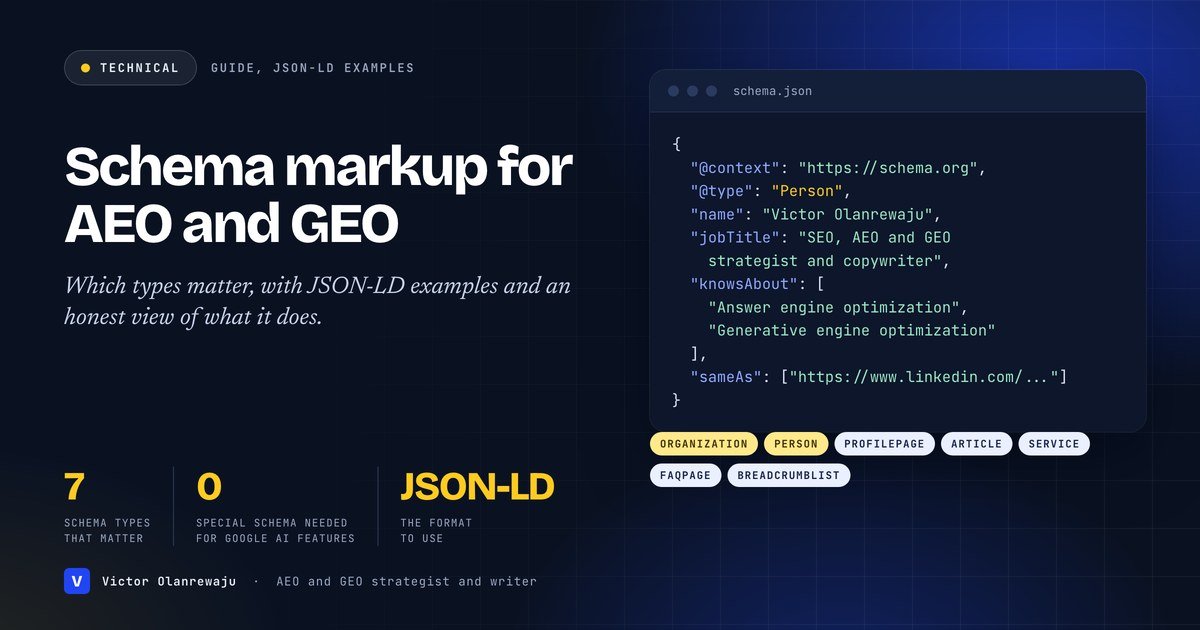
In short: Schema markup is structured data that tells search engines what a page and its entities mean. Google says it uses structured data to understand the content of a page and to gather information about the people and companies it mentions. For answer engine and generative engine optimization, the useful types are Organization, Person, ProfilePage, Article, Service, FAQPage and BreadcrumbList, written in JSON-LD and matching what is visible on the page. But Google also states that there is no special schema.org structured data you need to add to appear in its AI features. Markup clarifies your content and your entity. It does not replace useful content, and nobody can promise it will win an AI citation.
Schema markup attracts more myths than almost any other part of AI visibility. It is sold as a trick that makes assistants cite you, and dismissed as pointless. The truth is in between and is documented by the people who run the systems. This guide explains what structured data is, which types matter for a business or a personal brand, gives you copyable examples, shows how to implement and test it, and is clear about what it can and cannot do. It sits alongside crawler access and answer-first pages in the order of work.
What is schema markup?
Structured data is a standardized format for providing information about a page and classifying its content. Google’s introduction to structured data says Google Search works hard to understand the content of a page, and that you can help by providing explicit clues about its meaning. It adds that Google uses structured data that it finds on the web to understand the content of the page, and to gather information about the web and the world in general, such as information about the people, books or companies included in the markup. The vocabulary is defined by schema.org. The format Google recommends is JSON-LD, a block of data in the page’s code that sits apart from the visible layout.
Does schema help with AI citations?
Be careful here, because this is where overselling happens. The documented benefits are for search: understanding, and, for some types, rich results. Google’s guidance on AI features and your website says that to appear in AI Overviews and AI Mode there are no additional requirements, that you do not need to create new machine-readable files, AI text files or markup, and that there is no special schema.org structured data to add. It also asks you to make sure your structured data matches the visible text on the page.
I use schema for a different reason. It makes who you are, what you sell and who wrote a page unambiguous to any machine that reads it. That clarity is the foundation of being recommended, which I explain in AI citation versus AI recommendation. For other assistants such as ChatGPT, Claude and Perplexity there is no published statement that markup is used for citations, so treat it as a clarity aid and a good SEO practice, not a lever.
Which schema types matter for a business or a personal brand?
| Type | Use it for | Notes |
|---|---|---|
| Organization | Your company: name, URL, logo, address, contact, social profiles | Google documents Organization markup with properties such as name, url, logo, address, contactPoint, sameAs, alternateName, foundingDate and description |
| Person | The expert behind the content: name, job title, knowsAbout, sameAs | Google asks for real names in the name property and alternateName for social handles |
| ProfilePage | An about or author page whose main entity is a person or organization | Documented in Google’s profile page markup; mainEntity is required, dateCreated and dateModified are recommended |
| Article / BlogPosting | Each article: headline, author, dates, image | See Google’s article markup |
| Service | What you offer, who provides it and where | Connects services to the provider entity |
| FAQPage | Visible questions and answers | Google says FAQ rich results are only shown for well-known, authoritative government and health websites |
| BreadcrumbList | Site hierarchy | Shows where a page sits |
| LocalBusiness | A physical business with an address and opening hours | Use the most specific type that is true, and keep it identical to your Business Profile |
What does good JSON-LD look like?
A person linked to the company they founded
{
  "@context": "https://schema.org",
  "@graph": [
    {
      "@type": "Person",
      "@id": "https://example.com/#victor",
      "name": "Victor Olanrewaju",
      "jobTitle": "SEO, AEO and GEO strategist and copywriter",
      "worksFor": { "@id": "https://example.com/#vatam" },
      "knowsAbout": ["Search engine optimization",
                     "Answer engine optimization",
                     "Generative engine optimization"],
      "sameAs": ["https://www.linkedin.com/in/victor-olanrewaju"]
    },
    {
      "@type": "Organization",
      "@id": "https://example.com/#vatam",
      "name": "Vatam",
      "url": "https://vatam.co",
      "founder": { "@id": "https://example.com/#victor" }
    }
  ]
}
The @id values let you reference the same entity from many pages, so a Person on your about page, the author of every article and the founder of your company all point to one identity.
An article with an author
{
  "@context": "https://schema.org",
  "@type": "BlogPosting",
  "headline": "How to get cited by ChatGPT",
  "datePublished": "2026-10-11T09:00:00+02:00",
  "dateModified": "2026-10-11T09:00:00+02:00",
  "author": { "@id": "https://example.com/#victor" },
  "publisher": { "@id": "https://example.com/#victor" },
  "mainEntityOfPage": "https://example.com/how-to-get-cited-by-chatgpt/"
}
A service and its provider
{
  "@context": "https://schema.org",
  "@type": "Service",
  "name": "Generative engine optimization",
  "serviceType": "AI citation and recommendation",
  "provider": { "@id": "https://example.com/#victor" },
  "areaServed": ["East Africa", "Europe", "United States"]
}
An FAQ that matches the visible page
{
  "@context": "https://schema.org",
  "@type": "FAQPage",
  "mainEntity": [{
    "@type": "Question",
    "name": "What is AEO?",
    "acceptedAnswer": {
      "@type": "Answer",
      "text": "Answer engine optimization is ..."
    }
  }]
}
The text in the markup must match the question and answer a visitor can read on the page.
How do I add schema to a WordPress site?
- Use your theme or an SEO plugin that outputs JSON-LD, and check what it generates before adding anything else. Duplicates and conflicts are common when a theme and a plugin both output markup.
- Custom JSON-LD can go in a script tag in the page head through a theme template, a code snippet plugin or a custom field.
- Keep one source of truth. Store your business name, address, phone and social URLs in one place and generate every block from it, so they cannot drift apart.
- Do not hand-edit a hundred pages. Template it.
Google notes that if you use a CMS such as Wix, WordPress or Shopify, you might not be able to edit your HTML directly, and your CMS may have a search settings page or a plugin for specifying structured data.
How do I test and monitor it?
- Test with Google’s Rich Results Test for supported types and the Schema Markup Validator for general validity.
- Check that the markup matches what a visitor can see. Google’s structured data policies are the rules to follow.
- Verify your site in Google Search Console and monitor enhancement and error reports after each change, as Google recommends for discovering and diagnosing technical issues.
- Re-test after any theme or plugin update, because updates can change the output.
How does schema connect entities across the web?
The properties that do the most work for recognition are the ones that link your entity to the rest of the web:
- sameAs points to your official profiles, such as LinkedIn, X, GitHub, author pages on publications you write for and a Crunchbase or Muck Rack profile. Google describes it for Organization as the URL of a page on another website with additional information about your organization.
- @id gives each entity a stable identifier you can reuse.
- worksFor, founder, author and publisher link people to organizations and content.
- knowsAbout states your areas of expertise in plain terms.
Use only profiles that are really yours. Google’s helpful content guidance warns that fabricating creator profiles, such as with made-up names or false credentials, is deception that makes a page untrustworthy. The off-site side of this work, building real profiles and mentions, is as important as the markup itself.
What mistakes should you avoid?
- Marking up content visitors cannot see. Markup should describe the page, not add claims that are not there.
- Inventing credentials, reviews or ratings.
- Contradicting your profiles. If your schema says one address and your Google Business Profile another, you create the ambiguity you were trying to remove.
- Expecting a rich result from FAQ markup. See the table above.
- Duplicate or conflicting blocks from a theme and a plugin.
- Set and forget. Update dates, prices and services when they change, because stale markup contradicts fresh content.
- Believing schema replaces content. A page with perfect markup and nothing useful to say will not be cited.
A practical checklist
- Decide the entity each page is about, and which types fit.
- Create Organization and Person blocks once and reference them by @id everywhere.
- Add ProfilePage to your about page, BlogPosting to articles and Service to service pages.
- Add FAQPage only where visible questions and answers exist.
- Validate, then monitor in Search Console.
- Review quarterly and whenever your business details change.
Where does schema fit in the order of work?
After crawl access (AI crawlers and robots.txt) and after you have pages worth marking up (how to get cited by ChatGPT). It sits alongside an optional llms.txt file. If you want it implemented across a site, see my AEO strategist page. For the bigger picture, read SEO, AEO and GEO explained.
What does a real site output? This one, page by page
Here is exactly what the structured data on this website contains, as a worked example. It is generated from the same content as the visible pages, which is how I keep markup and text in sync.
| Page | Types in the markup |
|---|---|
| Home | WebSite, Person, Organization (Vatam), ProfilePage, ItemList of Service entries, FAQPage |
| About | WebSite, Person, Organization, ProfilePage, BreadcrumbList |
| Specialist pages (SEO, AEO and GEO strategist) | Person, Organization, Service, WebPage with author, reviewedBy, dates and citation list, BreadcrumbList, FAQPage |
| Work | WebPage, ItemList of results, BreadcrumbList, FAQPage |
| Pricing | ItemList of Service entries, each with an Offer and price in US dollars, BreadcrumbList, FAQPage |
| Each article | BlogPosting with author, publisher, dates, word count, time required and section, citation links to the sources, BreadcrumbList and, where the article has one, FAQPage |
| Insights index | Blog with a list of recent BlogPosting entries |
Two principles are visible in that list. Every page ties back to the same Person and Organization identifiers, so there is one identity across the site. And every FAQPage block matches visible questions on the page. If you view the page source of any page on this site you can read the JSON-LD yourself.
Which sameAs links should you include?
The sameAs property is your most direct way of saying “these other pages are also me”. Include only profiles you control or that are clearly about you:
- Your LinkedIn profile or company page.
- Author pages on publications you write for.
- Your official social profiles.
- Professional databases and directories where you have a verified profile, such as Crunchbase or Muck Rack.
- Your company’s other official domains.
Leave out profiles you do not control, pages that merely mention you and anything that would not survive a visitor clicking through. A short, accurate list beats a long, speculative one.
What about schema for an online store?
Stores typically add Product, Offer and, where genuine and permitted, review and rating markup, plus Organization and BreadcrumbList. Google’s AI features guidance mentions checking that your Merchant Center information is up to date, which is the product-data side of the same consistency principle. Three cautions for stores:
- Prices and availability must match the page at all times. A price in the markup that differs from the visible price is the kind of mismatch Google’s structured data policies warn against.
- Do not mark up reviews you cannot show. Ratings and reviews in markup should reflect real reviews that visitors can see.
- Plan for scale. A store with hundreds of products needs templated markup, which means your theme or plugin must be tested properly. The Lens & Co case shows what scale looks like: 104 published products and 54 pages, which cannot be marked up by hand.
How do you read validator messages?
- Errors mean something required is missing or malformed. Fix these first.
- Warnings mean a recommended property is absent. Add what is true and relevant, and ignore what does not apply.
- “Unparsable structured data” usually means a syntax problem, such as a missing comma or an unescaped quote, which is common when markup is generated by hand.
- “No items detected” may mean the markup is not on the page, is blocked from the tester or is a type the Rich Results Test does not report. Use the Schema Markup Validator to check general validity.
- Different results from different testers are normal. They check different things.
How do you keep markup correct over time?
- Keep one source of truth for business details, and generate markup from it.
- Add structured data checks to your launch and update checklists.
- After theme, plugin or template changes, re-run the validators on a sample of pages.
- Watch Search Console for new errors or warnings.
- When your business changes, update the markup in the same task as the visible page.
Should you use one JSON-LD graph or several blocks?
Both work. A single block with an @graph array, as in the examples above, keeps related entities together and makes cross-references explicit. Several separate blocks are simpler to generate from different templates. What matters is that every reference points to a stable @id, that no entity is defined twice with conflicting details, and that the markup describes the page it sits on. On a site with one Person and one Organization, define those two entities once, on a consistent URL such as the home page with a fragment identifier, and reference them everywhere else.
What does an about-page markup look like?
An about page is naturally a profile page. Google documents ProfilePage markup, with the person or organization as the main entity:
{
  "@context": "https://schema.org",
  "@type": "ProfilePage",
  "dateModified": "2026-10-11T09:00:00+02:00",
  "mainEntity": { "@id": "https://example.com/#victor" }
}
The Person block then carries the details: name, job title, expertise, location and sameAs links. Google asks for real names in the name property and alternateName for social handles, and says that mainEntity is required for this type while dateCreated and dateModified are recommended.
How should schema match your Google Business Profile?
For a local business, the most important consistency check is between your markup, your website and your Business Profile. Name, address, phone number, hours and category should read the same in all three. Differences, such as a suite number in one place and not another, or a different phone format, create the ambiguity that structured data is meant to remove. Check them side by side after any change, and treat the Business Profile as the master for local facts.
How do you explain schema to a developer?
A short brief saves rework:
- Output JSON-LD, not microdata, in the page head.
- Define Organization and Person once with stable @id values and reference them elsewhere.
- Generate every block from one data source for business details.
- Markup must match visible content. No hidden claims.
- Add Article markup to posts, ProfilePage to the about page and BreadcrumbList to inner pages.
- Make sure the theme and plugins do not output duplicate or conflicting blocks.
- Validate a sample of pages with the Rich Results Test and the Schema Markup Validator before launch.
A ten-point testing checklist
- JSON-LD parses without syntax errors.
- Each entity has a stable @id.
- The same details appear in the markup, the page and the Business Profile.
- Dates are in ISO 8601 format and are current.
- Author, publisher and organization references resolve.
- FAQ markup matches visible questions and answers.
- No duplicate types from theme and plugin.
- Prices and availability in markup match the page.
- sameAs links are all real, working and yours.
- Search Console shows no new structured data errors after launch.
Sources
Frequently asked questions
What is schema markup?
Schema markup, or structured data, is a standardized format for describing the content of a page and the entities it mentions. Google uses it to understand a page and to gather information about the people, books or companies in the markup.
Which schema types should a personal brand use?
Person, ProfilePage, Article or BlogPosting, Service, BreadcrumbList and, if you have an organization, Organization linked to the person as founder. Add FAQPage where you have visible questions and answers.
Does FAQ schema still show rich results?
Google says the FAQ feature is only shown for well-known, authoritative government and health websites. Most sites will not get a rich result from it, but it can still make questions and answers unambiguous.
Is schema required to appear in Google AI Overviews?
No. Google's documentation says there are no additional requirements to appear in AI Overviews or AI Mode and no special schema.org structured data to add. A page must be indexed and eligible to be shown in Search with a snippet.
How do I test my schema markup?
Use Google's Rich Results Test and the Schema Markup Validator, confirm the markup matches the visible page, and monitor reports in Google Search Console after changes.